
Minot State University
  • LOGINS
    • Email
    • Blackboard
    • Campus Connection
    • Starfish
    • Course Syllabi
    • HRMS Self Service
    • Finance Module
    • Help With Logins
  • ATHLETICS
  • ALUMNI & GIVING
    • EMPOWER
    • Alumni Website
    • Development Foundation
    • Board of Regents
    • Donate Now
  • INFO FOR
    • Admitted Students
    • Current Students
    • Parents & Families
    • Faculty & Staff
    • Military
    • Community
Minot State University

Minot State University

Be Seen. Be Heard. Be you.
APPLY VISIT REQUEST INFO
  • LOGINS
    • Email
    • Blackboard
    • Campus Connection
    • Starfish
    • Course Syllabi
    • HRMS Self Service
    • Finance Module
    • Help With Logins
  • CALENDAR
  • ADMISSIONS & AID
    • How to Apply
    • Visit & Tour
    • Cost & Aid
    • Majors & Programs
    • Graduate School
    • New Student Registration
    • Request Info
    • Contact Us
  • ACADEMICS
  • ATHLETICS
  • STUDENT LIFE
  • INFO FOR
    • Admitted Students
    • Current Students
    • Parents & Families
    • Faculty & Staff
    • Military
    • Community
  • ABOUT US
  • ALUMNI & GIVING
    • EMPOWER
    • Alumni Website
    • Development Foundation
    • Board of Regents
    • Donate Now
  • Make a Gift
>
  • Home
  • Accessibility Statement
  • Report Accessibility Issues
  • Roadmap
  • Training Course
  • Faculty & Staff Resources
  • Digital Accessibility Committee

 
  Minot State / Accessibility / Accessible Forms
Accessibility Portal

Accessible Forms

Currently many groups across campus use PDF forms. Most of these forms are currently not accessible. For simple forms, you may wish to continue using the PDF documents and remediate accessibility issues. Currently Adobe Acrobat Pro is available to all fulltime faculty and staff. Access to Adobe Acrobat Pro requires an ITC workorder request. 

  • WebAIM offers a concise guide to accessible PDF forms using Adobe Acrobat.
  • A video walkthrough on remediating PDF forms and tagging a PDF form from Northeast State

Web Forms

Web forms are the encouraged alternative to PDF forms. They generally produce well structured content with proper tagging.
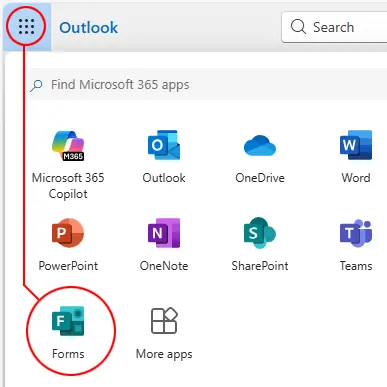
Illustration showing how to find the app launcher icon after logging into Outlook, under which Forms listed.

Microsoft Forms

All faculty and staff have access to Microsoft Forms, which can be found after logging into Outlook email. Once logged in, select the grid icon (link labeled "App launcher") in upper right corner and choose "Forms" from the list of products.

Qualtrics

For more complicated surveys and forms, Qualtrics is available. Access to Qualtrics requires your normal NDUS login credentials. Some advanced questions types should not be used.

  • Concise Qualtrics Accessibility Instructions
    • The checker is located under the "Review" section of the "Tools" menu
  • Using the Qualtrics Check Survey Accessibility Tool

Web Form Caveats

Microsoft Forms and Qualtrics can produce WCAG 2.1 AA compliant forms. Not all options will lead to compliant forms however.

  • Templates and font colors should have high contrast.
  • Care should be taken to ensure clear titles and descriptions.
  • Images require alt tags.
Follow Us:
Be Seen. Be Heard. Be you.
Minot State University
500 University Avenue West
Minot, ND 58707


1-800-777-0750
Accessibility
Privacy Policy
Title IX •  Clery Act
Report a Concern
Careers
North Dakota University System
Designated Agent: DMCA