
Information Technology Central
Accessing the Campus Wireless Network
Below is a list of available wireless connections across campus. If you need assistance, please stop by with your device at IT Central, 108 Old Main.
Staff, Faculty and Student Connections
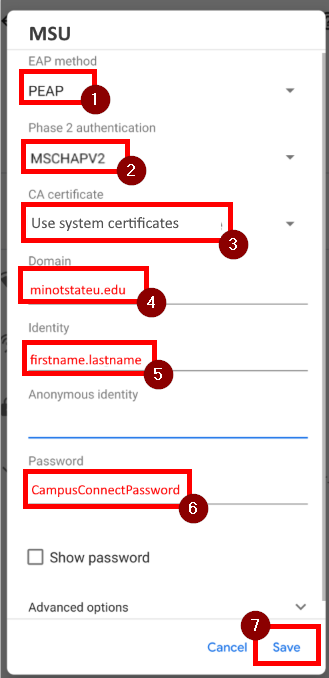
- MSU - Used for Minot State University staff, faculty and students. This wireless network is located across the entire campus. Users login with their campus connection credentials
- eduroam - EDUROAM (education roaming) is a secured wireless network service that allows students, staff, and faculty to use their home institution's wireless credentials to access wireless network services, when visiting other EDUROAM participating institutions, without having to set up a guest account. To get connected login with your campus connection userID + @ndus.edu (Example: student.name@ndus.edu) and your campus password.
Game consoles, streaming devices, and etc.
- GameConsole - Used for XBOX, Playstation, Roku, SmartTV, etc. This wireless network is located in the campus dormitory's. Please visit https://connect.minotstateu.edu/enroll/MinotStateUniversity/onboard/reset to register your device.
Temporary access for campus visitors
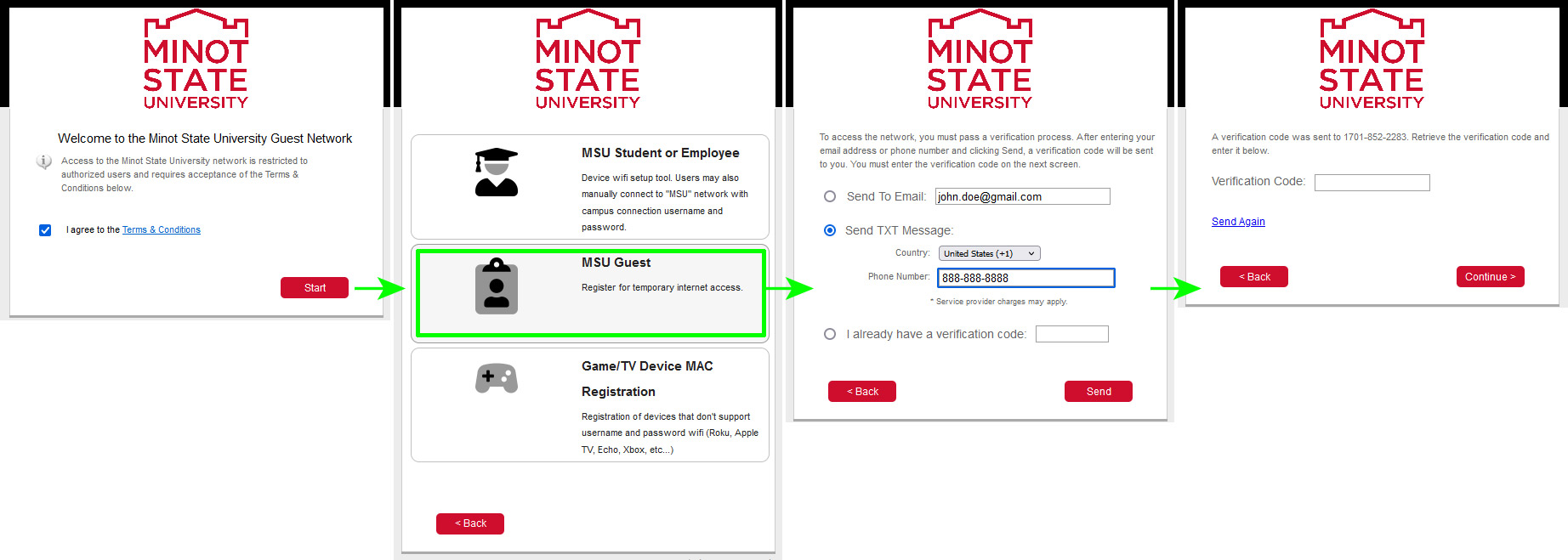
- Guest@MSU - Used for temporary access for campus visitors. This wireless network is located across the entire campus. To access, go to your wifi, select Guest@MSU, and enter your name, email, and phone number. You will need to enter your phone number in the following format: 888-888-8888. The access code will be sent to your email and texted to your phone, and it will be good for one week for up to three devices.
If you have problems connecting you may bring your device to Old Main 108 for setup.
Android/Chromebook Information: